Digitize Your Product Data
In our whitepaper, we let you in on how you can quickly make the shift from manual processes to smart workflows with a PIM system – intuitive, concrete, and easy to implement.


Damian Deßler
09 / 12 / 25·8 Min read
Process Optimization
Recently, a product manager asked me: “BPMN sounds like an IT monster. Do I really need yet another tool only techies understand?”
My answer surprised him: “BPMN is the opposite of that. It’s the first workflow tool for which you can operate without IT department.”
After a 20-minute live demo, he had built his first product release workflow. Without a single line of code. Without IT ticket. Without months’ worth of implementation time.
Most workflow solutions fall under one of the following two categories, and both are quick to hit their limits:
Category 1: The “Simple”
Category 2: The “Powerful”
The real pain point lies in integration: External workflow tools do not understand your product data. All they see are “generic datasets” instead of product attributes, categories, variants, and quality rules.
The consequence: Hours-long mapping work to teach the workflow what a “product type” is or how “data quality” is measured.
BPMN in ATAMYA Product Cloud solves both problems elegantly: Visual like a flowchart, powerful like an enterprise software, and fully integrated into your product data. The workflow engine works directly with the real product data in the PIM system.
Allow me to demonstrate to you what modern PIM automation looks like. Let’s built an intelligent product release process together – from the very first click to the completed automation.
Our scenario:
A new product is created → automatic data quality check → parallel editing by multiple teams → final release with datasheet generation. You can find the graphic for this workflow in step 5.
Every workflow begins with a trigger: in our example, it is the creation of a new product. As soon as a product is created, the process starts automatically. In ATAMYA Product Cloud, the first step in the workflow is referred to as “start event,” while such an element with a trigger is referred to as “signal start event.”
To do that, you simply click the start event in the toolbar to place it in the workflow editor, then change the start event to a signal start event (triangle icon), and, lastly, select the following type from the dropdown menu: “businessObjectCreated.”
From this moment on, the following applies: Whenever a product is created (be it manually, via import, or API), the workflow starts automatically. This way, an intelligent starting point comes to be at the click of a few buttons, smoothly setting the automation process into motion. And it does so without programming or IT effort.
With its next step, the workflow decides automatically which path the new product should take. Using a condition-based “exclusive gateway,” you can check whether it is a standard product or a special product. Standard products will run through the express workflow, while special products may first run through a manual pre-examination by product management.
In ATAMYA Product Cloud, you can very easily formulate this logic as an expression:
${masterDataService.getBusinessObjectAttribute(businessObjectId, domainId, “producttype”) == ‘standard’}
The above defines: standard products will directly enter the parallel editing phase, while all other products must first be examined and forwarded manually. This creates transparency, efficiency, and error-free processes. Without requiring any technical know-how.
In the third step, multiple tasks will be processed at the same time. Using a “parallel gateway,” three processes are started:
The service tasks are processed automatically in the background, while the marketing team works on the user task. The system waits until all three tasks are completed before the next step is initialized.
Since all tasks run parallelly, the editing time is reduced significantly: Instead of 90 minutes, this entire phase may only take roughly 30 minutes.
Step 4: Intelligent Quality Check (3 Minutes)
Before a product is released, the workflow automatically checks data quality.
Subsequently, an exclusive gateway defines which direction the workflow must take: If there are errors, then send the product back for post-editing by the product management. If there are no errors, then start the release and trigger the datasheet generation.
The automation logic for this is:
${masterDataService.getBusinessObjectQualityResult(businessObjectId, domainId).summary.errors > 0}
Translation: The gateway checks the data quality of the product automatically and starts the release step for error-free products.
To wrap things up, the workflow processes three automated tasks back-to-back: First, the product is set to active, then the datasheet is generated, and, lastly, the synchronization with the online shop is carried out.
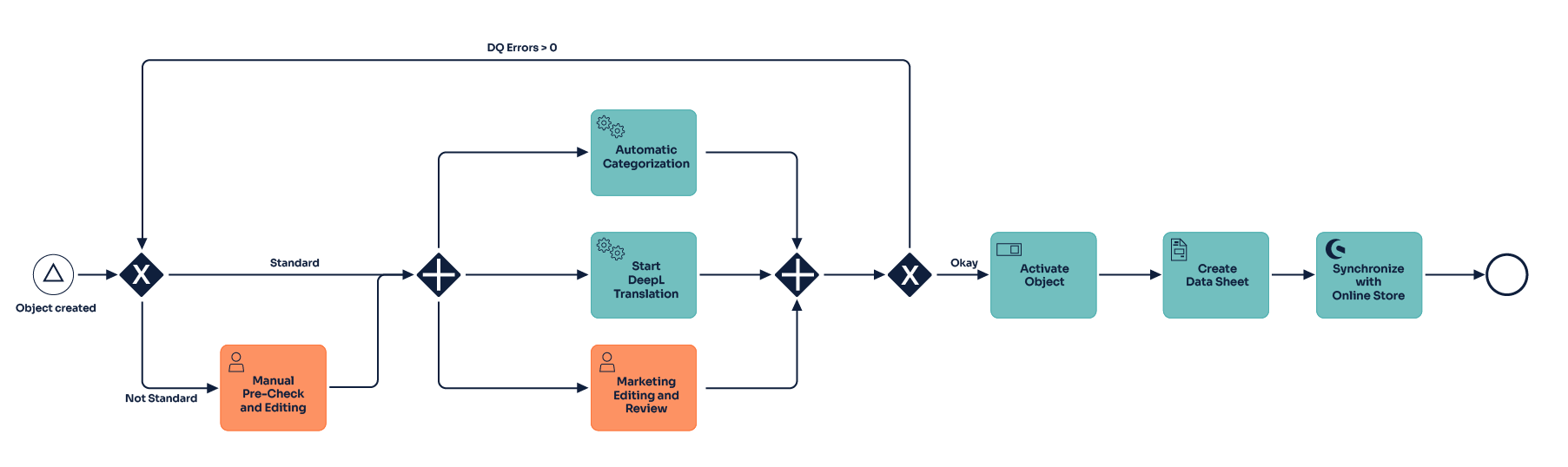
These steps are realized automatically in ATAMYA Product Cloud, without requiring manual intervention. As a result, continuous, efficient release processes come to life that save weeks’ worth of coordination work and sustainably improve data quality.
Manually, the entire process takes about six weeks – including more than 15 e-mail feedback loops, 23 manual work steps, and an error rate of 40 percent in the first iteration cycle.
Thanks to BPMN automation, this process runs completely automatically: The runtime is only two days, no e-mail coordination is required anymore, there are only three nodes requiring manual input, and the post-editing rate drops to no more than five percent.
| Before (Manual Process) | After (BPMN Automation) |
| 6 Weeks Runtime | 2 Days Runtime |
| 15+ E-mail Feedback Loops | 0 E-mail Coordination |
| 23 Manual Work Steps | 3 Manual Input Points |
| 40% Error Rate | 5% Post-Editing Rate |
The customer often times asks me: “Why BPMN and not simpler workflow tools?”
The answer lies in its universality:
BPMN is an international standard (ISO/IEC 19510) – and this is exactly what makes it so valuable.
The business side understands it immediately: Product managers will be quick to recognize process steps, the marketing clearly sees its tasks in the workflow, and management identifies bottlenecks and optimization potentials at a glance.
The IT can get to work immediately: Developers can make sense of the implementation requirements, system architects see the intersection points for integrations, and DevOps can implement the performance monitoring without feedback cycles.
No “translation work” required between corporate departments:
Instead of endless meetings about “What does the workflow actually do?,” you simply show the BPMN diagram. Every department understands it, can join in, and make suggestions for improvements.
The result: Workflows will no longer be developed on IT islands but optimized together by business and IT.
Throughout 20 years of project experience, I have come to know: product managers want control, not complexity.
What they need:
What they do NOT require:
BPMN in ATAMYA Product Cloud delivers precisely that: The power of enterprise BPMN combined with the user friendliness of a modern tool.
For your workflow success, you need to understand five BPMN symbols:

That’s it. With these five symbols, you can model about 80 percent of all product processes.
And now a small task for you: Take your most frequent product process and draw it as a BPMN diagram. On paper. With symbols:
You will come to realize two things:
In practice, the following typical pitfalls come up again and again:
Mistake 1: Too Much Details while Starting
Mistake 2: Forgetting about Parallel Gateways
Mistake 3: No Exception Handling
In the next article, I will show you the actual BPMN magic: smart routing with intelligent gateways. Learn how workflows make decisions ten times faster than human beings – without committing any mistakes.
Click here for the next article in the series: “Smart Routing: How Intelligent Workflows Make Decisions 10× Faster than People”
Spoiler: This will be about AI-based product identification, automatic quality checks, and self-learning escalation paths. Plus: How to convince your team of smart workflows without giving the feel of adding “yet another tool.”
Author:
Damian Deßler
Senior MDM/PIM Consultant & Architect for Digital Transformation at synfion
Digitize Your Product Data
In our whitepaper, we let you in on how you can quickly make the shift from manual processes to smart workflows with a PIM system – intuitive, concrete, and easy to implement.
These articles may also interest you