AI-Powered Workflows

AI as a process. Not as a button.
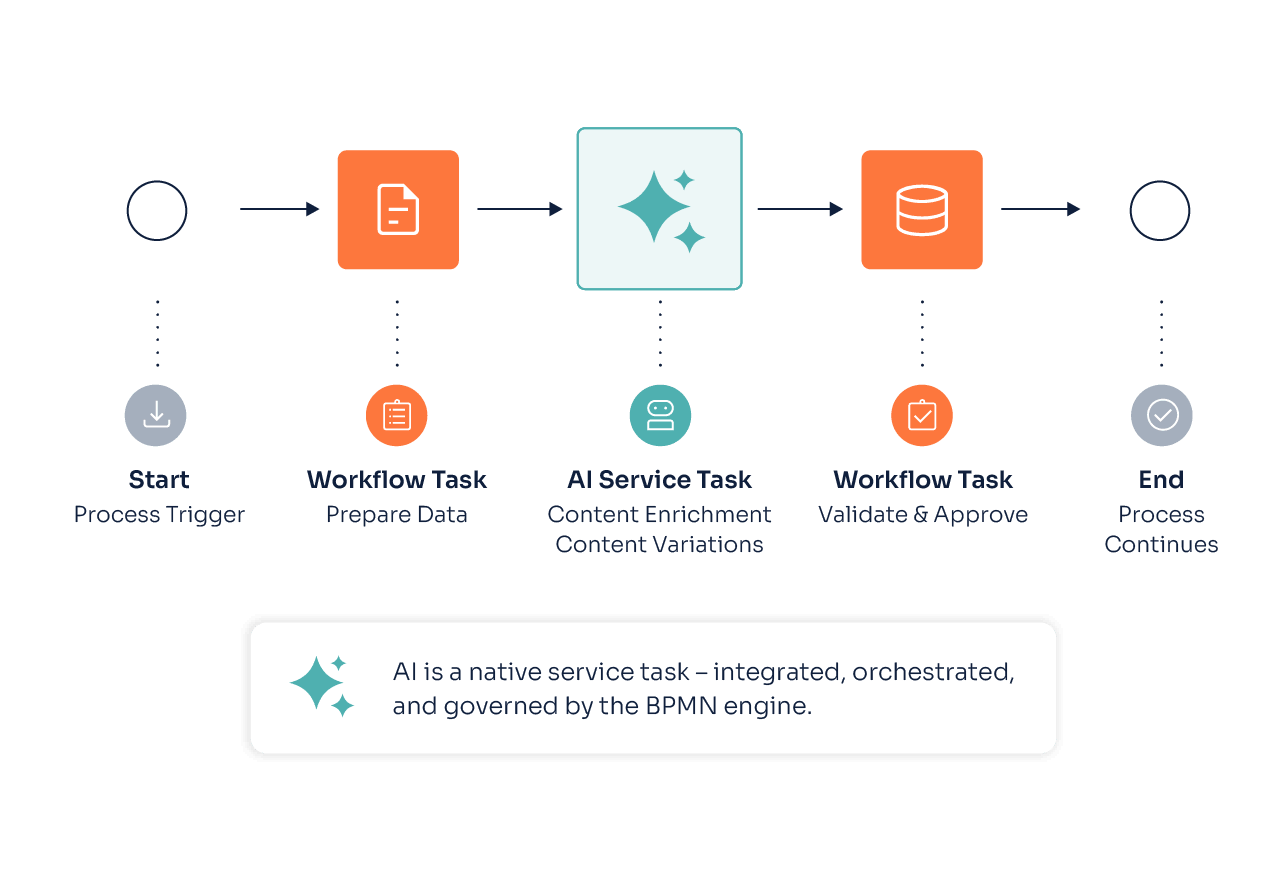
In many PIM systems, AI lives in a separate window. In ATAMYA, however, it operates directly from within the process itself – as a native service task, orchestrated by a full-fledged BPMN engine. Sounds like an infrastructure detail. Indeed, it is. And that’s why it works.
See Our AI Workflow Live

AI Service Task: No Prompt Window, but a Process Step.

Imagine a classic AI chatbot in a PIM. Prompt comes in, text comes out, copy, then paste. While this might indeed be helpful, it is far from an integrated process: No system. No context. No traceability.

An AI service task in ATAMYA functions differently. It’s a BPMN service task – just like “Active Object,” “Edit Attribute Value,” or “Synch with Shopware.” It has inputs, outputs, as well as conditions before and after. You can run it parallelly, embedded it in loops, or escalate it in error cases. It writes values as variables that can be referenced in subsequent workflow steps.

In short: AI becomes an integral component of the workflow engine and takes care of your complete orchestration logic.

What AI is Already Accomplishing Today in ATAMYA

ATAMYA offers multiple AI-native tasks – fully configurable components with prompts, variables, targeted outputs, and guardrails:

  • Generate Text Content: Free-text prompt with dynamic variables, the result is assigned directly to a variable.
  • Translate Texts: Dedicated translation tasks, optionally with DeepL for maximum quality, including your business terminology.
  • Extract Attribute Values from PDFs: Product datasheets or supplier documents can be read automatically – the AI identifies attributes and adds their values to relevant objects.
  • Decision-Making Aid: AI can answer only with true or false – directly useable in the following gateway.

Every task can be repeated as many times as necessary, connected to conditions, or supplied with live data from your PIM via our expression language.

When AI Cooperates in Process Decisions

In ATAMYA, AI does not only generate content but prepares decisions directly in your workflow. AI responses land in variables and flow into gateway conditions via our expression language.

An example: As soon as a new product is created, a first AI task generates the product description. A second one validates the regulatory requirements and responds with true or false.

The gateway decides automatically:

  • true → object is activated automatically
  • false → a user task is sent to the technical writers, including missing aspects identified by a third AI call

Three service tasks. One gateway. Not a single line of custom code. And the editing team only receives cases that truly require their attention.

Expression Language: AI Straight from Your PIM

What makes an AI task in ATAMYA so powerful is not simply that it is AI-based but the expression language upon which it is grounded. It accesses your product data and renders prompts dynamic: no static texts but an intelligent combination of data, contexts, and rules.

Here is what else you can map with expressions:

  • Dynamic attribute values that can be used in prompts – including data languages and contextualized attribute values
  • Set and read variables – to use them in subsequent workflow steps
  • Computing numeric values – DQM scores, degree of completion, or confidence rating
  • Combination of multiple attributes, objects, and domains in a single call

The result: One-time set up, applicable dynamically to thousands of cases. For each product, each domain, and each language.

Human-in-the-Loop is Part of the Process, not the Exception

“AI is great – but only if I can double-check its results.” A justifiable approach. This is why human-in-the-loop is not a safety net in ATAMYA but, much rather, a native workflow step.

Every AI output can be directly written into a user task. People in response can view the result to either accept, adjust, or decline it – the decision then flows into a workflow variable, and the process continues.

Practical example: The AI suggests a classification. If the confidence score is high enough, it will be processed automatically. If it is below the user-defined threshold, a review is generated for the product manager – with AI suggestions as the starting point, not the decision itself.

People are not replaced. They receive the tasks that actually matter.

Four Paths to Start a Workflow

AI steps live in workflows – and workflows can be started in four different ways in ATAMYA.
Be it by a person with a manual mouse click, a user-defined schedule, or an external system call – the workflow engine listens for the event trigger, fills out the start variables, and boots the process. With or without AI tasks. The orchestration remains one and the same.


Manually

via a button on the relevant business object’s or group’s details page

Time-Controlled

via timer definitions, scheduling, say, a DQM check overnight at 3:00 AM

From Inside

via signal start events triggered upon a user-defined event like product creation, attribute change, or state changes

From Outside

via REST calls by external systems or our MCP server

Q&A about AI Workflows

Can I add my own AI prompts, without depending on developers?

Yes. Every AI service task can be set up directly in the graphical workflow editor. The prompt is a free-text field in which you can insert dynamic expressions and variables into a simple syntax (`${…}`). No deployment or custom code required.

How do AI tasks handle errors?

Just like any other BPMN service task. The engine supports error handling, retries, timeouts, and escalations. When a provider is not available for a short time, you can automatically redirect the flow to a fallback path or generate a user task.

Can I combine DeepL with LLMs?

Yes – and we even recommend doing so in many scenarios. DeepL delivers excellent base translations, the LLM then adjusts its tonality, terminology, or market language. Both as separate service tasks, sequentially chained together.

How does confidence-based routing work?

The AI returns a value – as a number of flag (true/false). This value is written as a variable. A gateway interprets the flag and banches out into possible flows. The classic pattern is: Given a high confidence score, the process continues automatically. Given a low score, the process is passed over to a person.

Can I apply my existing BPMN knowledge in ATAMYA?

By implementing “bpmn.io” and Flowable Expression Language, ATAMYA utilizes established open-source standards. Those who already work with BPMN will get the hang of it quickly. ATAMYA-specific expansions are cleanly documented and directly available in the graphical workflow editor.

Product Data Processes that Run for 30 Days? AI Makes it 2. Experience How in a Demo.

AI at its core. Product data in its flow: Experience how our automation functions – from smart import, through workflows, to MCP servers, and your own LLM integrations.

Request AI Demo